The short answer
Choose SkyViz if you mostly want a free, unlimited logbook and quick videos for social media. Choose XCviewer if you want 3D replay on the free plan and deeper tools before takeoff and after landing: climb and glide analysis, the KK7 thermal map, an XC planner with FAI triangles, airspace and paragliding weather.
Choose SkyViz if…
- You want a free logbook with unlimited flights and XContest import.
- Your main goal is a short vertical video for Instagram or TikTok.
- You like Strava-style story overlays, included in SkyViz’s free plan.
Choose XCviewer if…
- You want to replay your flights in 3D for free, not just the first one.
- You want to understand your flight: synchronized graphs, track colors by vario, speed or height above ground, the KK7 thermal map and a measuring tool.
- You also plan cross-country flights: FAI triangles, XContest-style scoring, airspace, a flyability score and wind layers are in the same app.
- You run a paragliding school and want to follow your students’ flights.
Feature by feature
| Feature | XCviewer | SkyViz |
|---|---|---|
| Works in the browser | YesWeb app, also on phones and tablets | Yes |
| 3D replay of IGC files | YesFree | Paid planPro; the first 3D replay is free |
| Flight analysis (graphs, climbs, glides) | YesGraphs on the free plan; KK7 thermals and advanced colors in Pro | PartlyLogbook statistics and trends, live metrics during replay |
| Several flights replayed together | Paid planUp to 10 flights in sync | Paid planMulti-track 3D replay |
| Video export | Paid planAutomatic camera styles and a video Studio | Paid planAutomatic cinematic camera, 9:16 and 16:9 MP4 |
| Flight logbook | Partly2 saved flights free, unlimited in Pro | YesFree and unlimited, XContest import |
| XC route planner | Paid planFAI triangles, XContest-style scoring, wind-aware glide | Not listed |
| Airspace | Paid planAirspace map and 3D route analysis | Not listed |
| Paragliding weather | YesForecast free; flyability score, wind layers, stations and webcams in Pro | Not listed |
| Live tracking | Not listed | Not listed |
| Price | Free plan, Pro subscription (monthly or yearly) | Free Basic plan; Pro €4.90/month billed yearly |
“Paid plan” means the feature needs a subscription. “Not listed” means we could not find the feature on the tool’s website.
Information checked on October 7, 2026 from each tool’s public website. Features and prices change: if something is out of date, write to us and we will correct it.
SkyViz, flyXC, SeeYou, Google Earth, Ayvri, Doarama, XContest, XCTrack and the other names mentioned are trademarks of their respective owners. XCviewer is not affiliated with them.
XCviewer in action
Real screens from XCviewer. Each one links to a step-by-step tutorial.
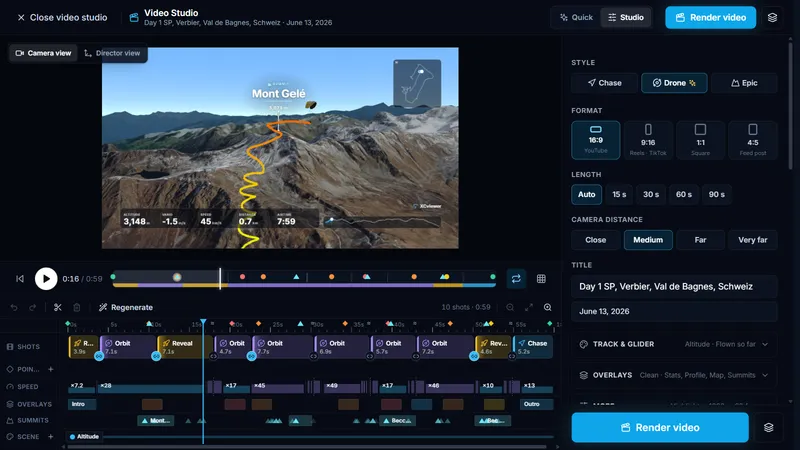
Video Studio: edit camera moves, timing and overlays shot by shot
See the tutorial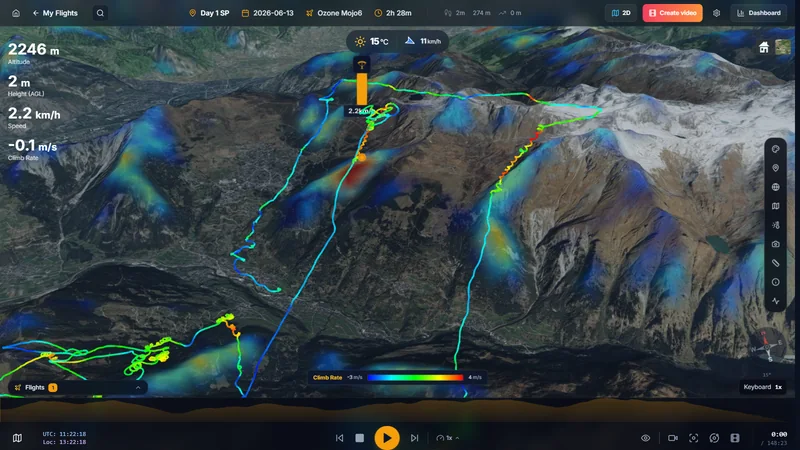
Your climbs compared with the kk7 thermal probability map
See the tutorial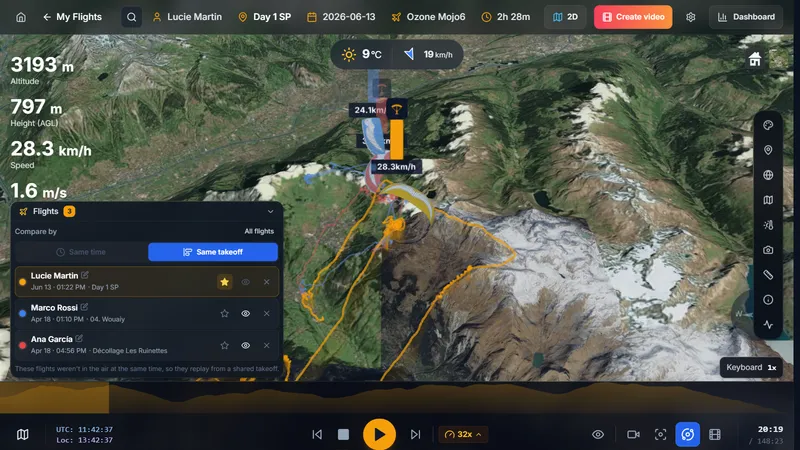
Three flights replayed together from the same takeoff to compare lines and climbs
See the tutorial
Try XCviewer with your own flight
- 1
Get your IGC file: from your instrument, from XCTrack’s Tracklogs folder, or from XContest.
- 2
Create a free XCviewer account and drop the file into the upload area. The free plan keeps up to 2 flights.
- 3
Open the flight and press 3D to replay it over real terrain.
Frequently asked questions
Is SkyViz free?
SkyViz has a free Basic plan with an unlimited logbook, statistics, a 2D map and social overlays. Its 3D viewer and video creator are in SkyViz Pro (€4.90 per month billed yearly when we checked), with a first 3D replay offered. XCviewer’s free plan includes 3D replay and graphs, with up to 2 saved flights.
Which one makes better flight videos?
Both turn an IGC file into an MP4 video. SkyViz focuses on automatic, social-ready videos in 9:16 or 16:9. XCviewer offers three automatic camera styles and a Studio to adjust shots, overlays and timing; the yearly plan removes the watermark and adds manual camera paths.
Can I use both?
Yes. Both read standard IGC files, so you can keep your logbook in one and analyze or plan your flights in the other.